.svg)

Definition: What is a webhook?
Webhooks enable one-way communication between systems and operate according to an event-driven model. They are also known as ‘reverse APIs’ because data transfer is initiated by the server that holds the data. As a user-defined HTTP callback, data is only transferred automatically from one application to another in response to specific triggers. This could be, for example, the receipt of a new order on an e-commerce platform. This approach reduces the need for continuous communication and thus minimises resource consumption, as the exchange is event-based.
How does a webhook work?
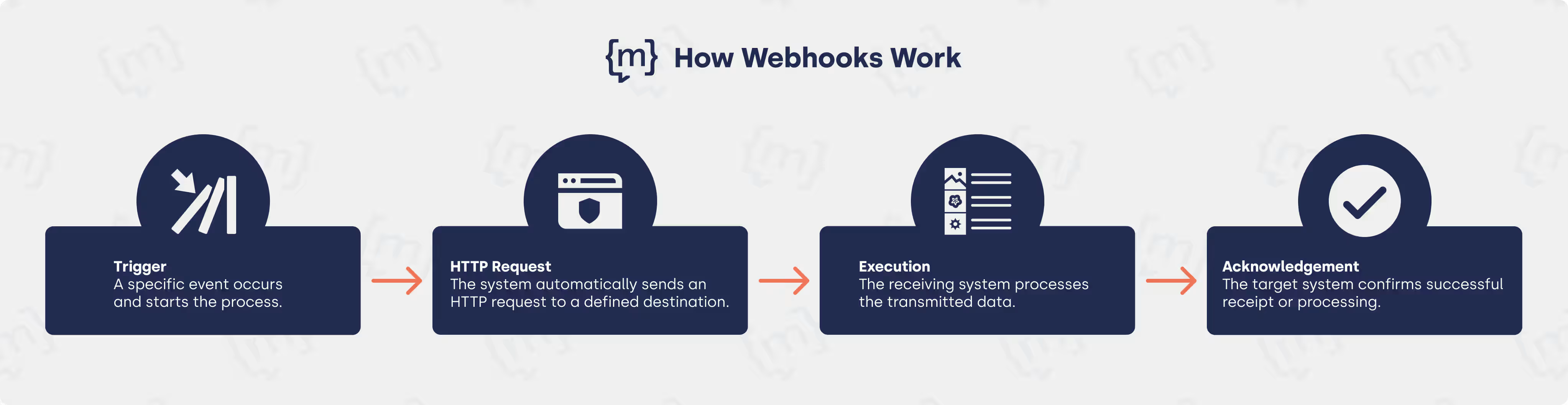
Webhooks use a simple structure for data exchange between two applications. When a predefined event occurs, the source application automatically sends the payload via an HTTP request to the target application's webhook endpoint.
The payload, usually in JSON format, contains all relevant information: the event type, associated data, and supplementary metadata. The transmitted data is received and processed. The following four steps are distinguished in the process:
- Event (trigger): A specific event starts the process, e.g. a new order in an online shop, a payment or a message in a chatbot that triggers the communication.
- HTTP request: The system automatically sends an HTTP POST request with the relevant data to the previously defined webhook endpoint.
- Processing: The receiving application accepts the data and performs the appropriate action, e.g. sending a notification, updating the database or initiating another process.
- Confirmation: Successful receipt or processing is confirmed by the target system.
Differences between API and webhook
While webhooks automatically transmit data in real time as soon as an event occurs, APIs provide data and functions on demand. In modern architectures, they often work together, enabling up-to-date, efficient systems without unnecessary polling. Polling refers to the process whereby a system regularly actively queries another service or resource to check whether new data or events are available.
Both technologies enable data exchange between clients and servers of web applications as well as between different system components, however, they differ significantly in their architecture and functionality and are suitable for different application scenarios. Here are the most important differences:
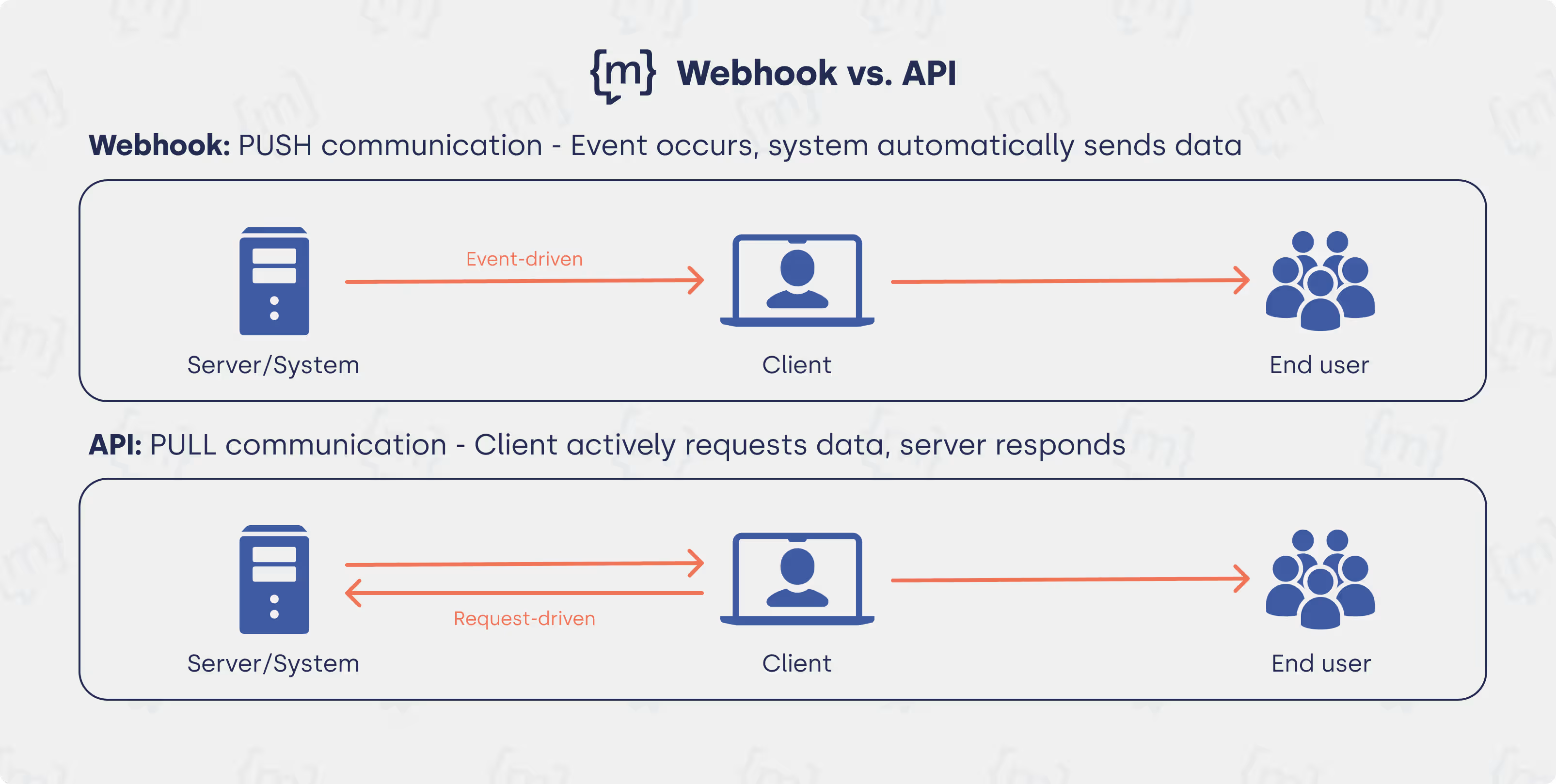
Webhooks automatically send data to the client when an event occurs, also known as the push principle. This enables real-time transmission with lower technical overhead. Typical use cases include immediate responses to events or notifications, while APIs are primarily used for targeted data retrieval and updates.
APIs work according to the request-response principle, also known as the pull principle: The client initiates the data transfer by actively making a request, to which the server responds. Real-time data transfer is not usually provided for, and repeated queries result in greater complexity and ongoing system load. The two modes of operation are illustrated graphically here:
Advantages of webhooks
This technology is particularly notable for its resource efficiency, simple integration via the HTTP standard and flexibility in use. Webhooks offer companies the following advantages, among others:
- Real-time communication: Data is transferred immediately as soon as an event occurs, without delay due to manual queries.
- Resource efficiency: Server and network resources are conserved, as there are no continuous API requests.
- Automation: Processes can run without manual intervention, reducing workload and minimising sources of error.
- High scalability: Webhooks can be easily extended to many events and systems without compromising performance.
- Flexibility and easy integration: Webhooks can be immediately integrated into existing systems and applications and combined with almost any platform or application that supports HTTP requests.
What should companies bear in mind when using webhooks?
Webhook endpoints are publicly accessible and represent a critical security aspect. Appropriate authentication, for example via tokens or HMAC signatures, is therefore necessary to prevent unauthorised third parties from manipulating processes and data. HTTPS is mandatory.
Another problem with webhooks is that unilateral and asynchronous communication makes it difficult to debug failed webhook calls. Compared to classic API requests, webhooks offer less transparency regarding delivery status. Consistent logging and monitoring can help here.
Queues and rate limiting help to avoid overloads and ensure system stability when there is a high volume of events. If the receiving server is unavailable at the time of an event, data could be lost unless a retry mechanism is implemented. At the same time, the same event may be transmitted multiple times. In this case, the receiving server must ensure that multiple incoming data does not lead to duplicate actions.
Examples: Webhooks in use
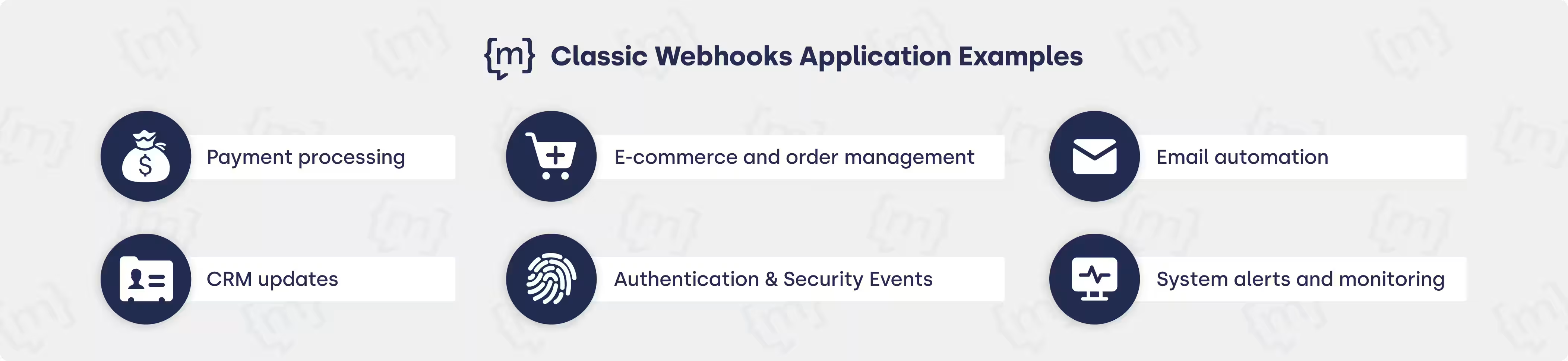
Classic examples of webhooks include sending a payment confirmation after a transaction, transferring data from contact forms to a CRM system, and automated notifications in tools such as Slack, triggered by checking off Jira tasks, for example. All these processes are triggered by events.
The application for chatbots is particularly exciting: webhooks enable chatbots to communicate with a company's systems and databases in order to provide individualised and case-closing responses. This makes them an important prerequisite for modern AI chatbots to meet user expectations. The following scenarios are typical cases in which webhooks are used:
- Chatbot communication & CRM integration: Webhooks enable AI chatbots such as moinAI to access customer data in real time. When a query is made in the chat, the webhook automatically retrieves relevant information from the CRM, including customer status or contract data.
- Form data transfer: When the user enters data in the form, e.g. a customer number, a webhook immediately transfers this data to the backend system for processing or authentication without the need for manual intervention.
- Automatic ticket creation: An unresolved query or escalation can automatically trigger the creation of a support ticket in the helpdesk system as a defined event in the chat. This is done via webhook.
Webhooks in moinAI chatbot forms
.avif)
The examples show that webhooks demonstrate their added value above all in real-time communication and automated processes. This makes them a key technology for modern AI chatbots such as those from moinAI. Here are the classic use cases at a glance:
Outlook
Webhooks are a valuable component for enabling real-time communication between applications and automating processes. With the targeted use of webhooks, taking into account security, monitoring and error handling, companies can benefit from flexible integration and a scalable solution. moinAI shows how this works in practice: the AI chatbot uses webhooks to communicate seamlessly with existing enterprise systems.
[[CTA headline="How webhooks automate processes and create real added value in companies" subline="Experience webhooks in practice with the moinAI AI chatbot!" button="Try it now"]]