.png)

What are AI Workflows?
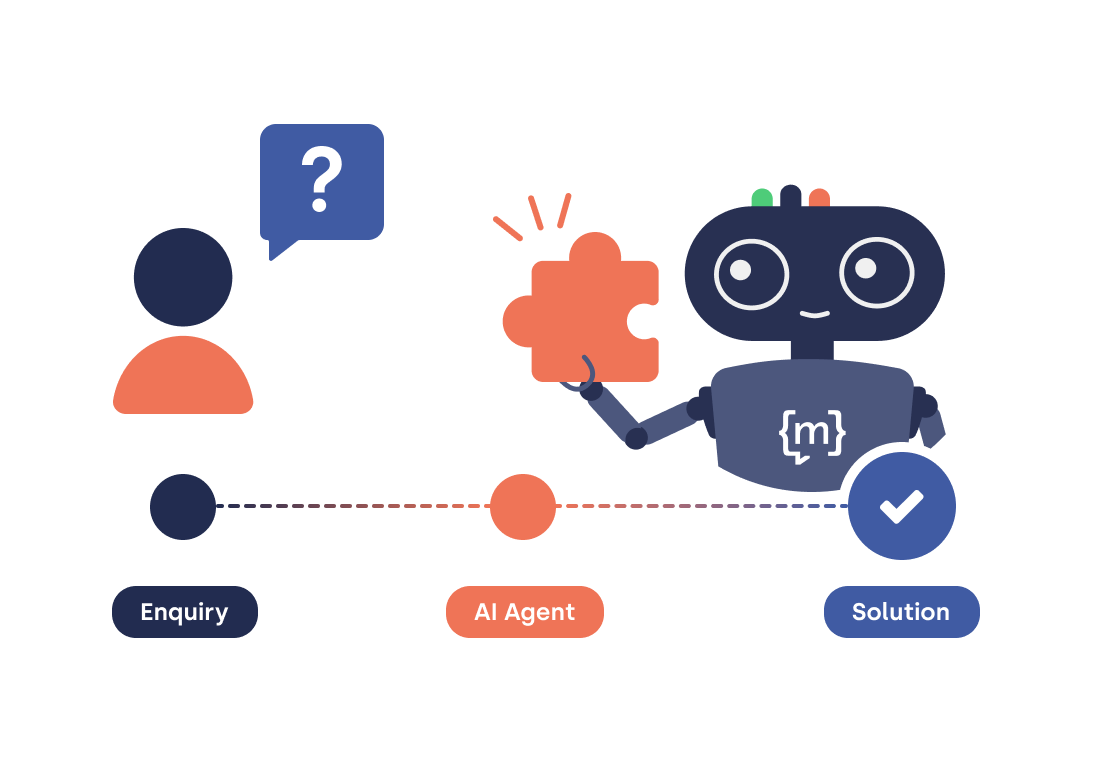
AI workflows are structured sequences of process steps that are processed and completed automatically by an AI model. A typical example is a user requesting a change of address via chat. The AI-powered chatbot verifies the user’s identity and then updates the CRM record, entirely without human intervention. The AI workflow is always triggered by a specific trigger, i.e. an initiating event. The process is completed with a specific action. The key features of AI workflows are as follows:
- AI application: AI technologies for pattern recognition, text generation and image analysis are used within the process steps. The AI automates the process based on the individual steps and resolves the request ‘step-by-step’.
- Automation: Recurring business processes are executed using AI without the need for manual intervention.
- Predefined workflows: The decision-making logic is predefined, thereby reducing manual work and accelerating processes; however, the workflow for specific sub-steps is influenced by LLM.
What distinguishes basic AI chatbot automation from genuine AI workflows?
AI chatbots are primarily designed to communicate with users, i.e. to exchange information and answer user queries, whereas AI workflows carry out actions intelligently and autonomously. AI workflows operate in a goal-oriented and context-sensitive manner, offering a high degree of flexibility compared to traditional automation, where steps are often rule-based and rigid (“If X → Y”). If an input deviates from the expected pattern, the process fails. AI workflows, on the other hand, understand the intent behind an input. The underlying language model interprets even unexpected queries and navigates the process accordingly.
Added to this is what is known as the ‘agent-driven loop’: the model decides for itself whether and which tools it needs (e.g. a database query or a transaction). The result is fed back into the model, which uses it to determine the next action or generates a response directly.
Here are the differences at a glance:
AI Agent vs. AI Workflow: What’s the difference?
AI workflows are often used interchangeably with AI agents, but the terms describe different concepts:
- An AI agent is an autonomous system. It plans independently and makes iterative decisions about which steps to take next by continuously assessing its current state. An agent can fail and replan actions, acting like an independent ‘digital employee’.
- An AI workflow utilises a clearly predefined framework. It defines a sequence of steps in which one or more AI components, including agents, interact in a coordinated manner.
The workflow thus provides the framework, whilst the agent fills it with autonomous behaviour. A workflow can comprise multiple agents and defines the overarching process. The agents handle the individual steps flexibly. The following diagram summarises the distinction between the terms clearly and at a glance:
.png)
[[CTA headline="Is your customer service team still working without AI workflows?" subline="moinAI handles repetitive enquiries automatically and directly in the chat, integrated with your systems." button="Try it now"]]
How do AI workflows work in the context of chatbots?
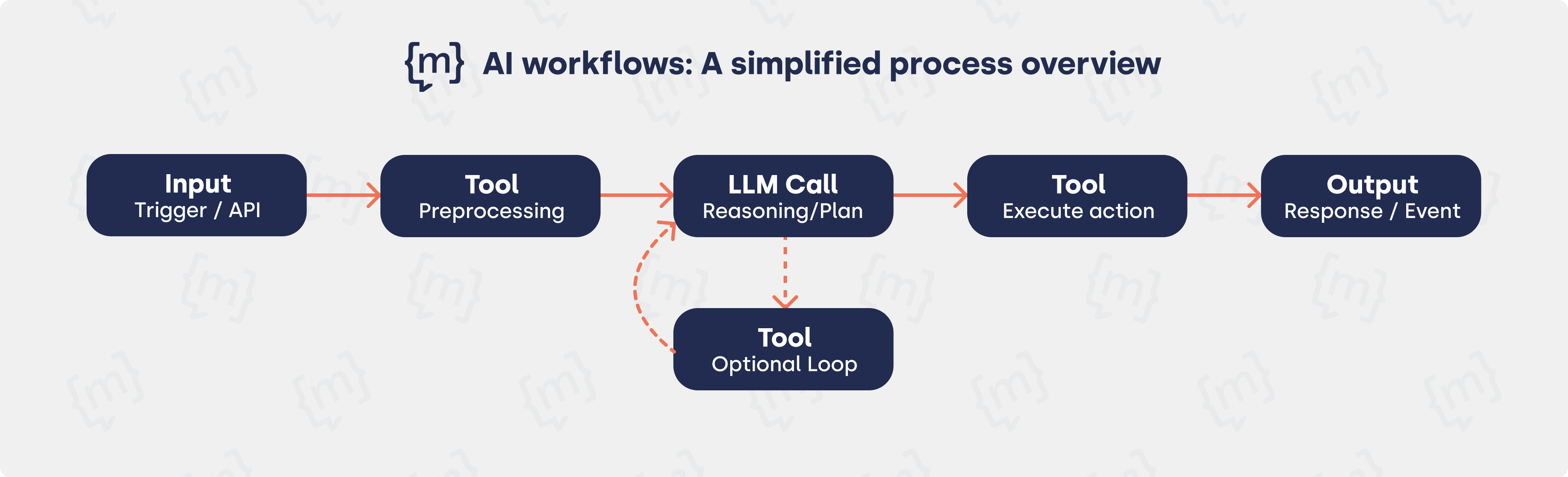
If a user submits a request via chat, the task can, where appropriate, be carried out using an AI workflow. However, not every request requires an AI workflow, as simpler requests can often be handled directly in the chat by the AI chatbot. An AI workflow typically processes multi-step inputs, retrieves relevant information, determines the next action, and delivers a result. It is crucial that everything runs quickly and in a coordinated manner, as this is the only way to increase efficiency within the company. Every AI workflow has three core structures:
- Trigger: A user request, a webhook, a form or an external event initiates the workflow.
- AI processing: The LLM analyses the context and interprets the intent in order to select the appropriate follow-up action. Conversation history, user role, available tools and the system prompt are interpreted.
- Action: The selected action is executed via integrated tools, e.g. the CRM, calendar or database. The result is then fed back into the language model and displayed directly in the chat.
The model first executes an action, evaluates the result and decides whether further steps are necessary, until the goal is fully achieved. This mechanism makes AI workflows fundamentally more powerful than linear automations. Requests often cannot be resolved in a single step, which is why agentic loops are used. The process is as follows:
How are AI workflows implemented?
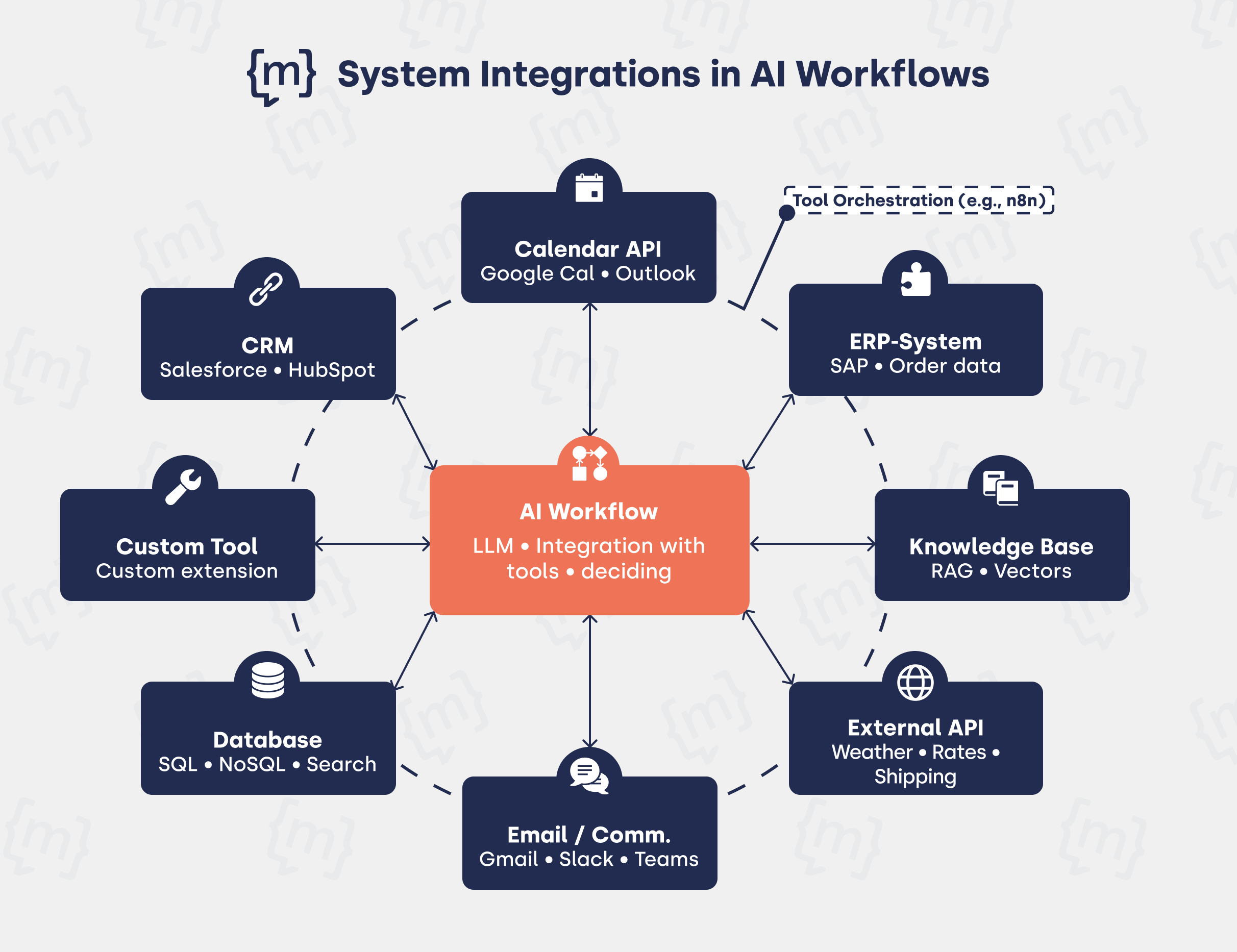
The first step is to define the trigger: what triggers the workflow? It determines when the workflow starts and what input data is used. The next step is to define the system connections. Typical integration points in a chatbot context are
- CRM platforms (Salesforce, HubSpot),
- Calendar APIs (Google Calendar, Outlook),
- ERP systems,
- Internal knowledge bases and
- External real-time APIs (e.g. for weather data, exchange rates, delivery status).
They are registered as tools and linked to the AI model; the description must be understandable to the AI model, as this is used to determine when it should activate which system.
The model is then configured via a system prompt: the prompt defines the role, behaviour and available tools, and determines how the model responds to inputs. Finally, the most important phase involves testing and iteration to ensure the reliability of the workflow.
In practice, visual low-code platforms such as n8n, Make or Zapier are frequently used. They act as middleware between the AI chatbot and the connected systems, enabling workflows to be set up without the need for extensive programming. For more complex requirements, these approaches can be gradually expanded with custom code. n8n is particularly worth highlighting here, as this self-hostable open-source solution can be tightly integrated into existing IT infrastructures and gives companies full control over their data flows. We have summarised more about n8n here in our article on n8n integration.
In which areas are AI workflows used at moinAI?
moinAI provides ready-made chatbot workflows on its own platform, which customers can select, customise and deploy immediately without any programming knowledge. These workflows link the AI chatbot to external tools such as Google Calendar, CRM systems or SQL databases, and map end-to-end processes within the organisation. Let’s take a look at specific areas where AI workflows can be used, with an example from the moinAI workflow library for each:
Customer Service and Self-Service
Typical customer service enquiries can be efficiently automated using AI workflows, including, for example:
- Address changes with real-time validation via the Google Maps API
- Contract details and identity verification
- Automatic CRM updates after every interaction
We demonstrate how the address change process works in chat in the following video:
Appointment Booking and Lead Qualification
When it comes to booking appointments and lead qualification, AI workflows can handle the entire booking process, from the first click to the calendar entry:
- Book initial consultations directly within the chat interface
- Transfer qualified lead data directly into the CRM system
- Send automated confirmation emails to users
- Create appointments as calendar entries for the employee
The AI coordinates tasks independently and ensures a seamless flow of data. This also applies to appointment booking:
Industry-specific Applications
The moinAI platform offers comprehensive, customised workflow templates for various industries, including finance, energy, e-commerce and HR. Examples of AI workflows include:
- Secure user authentication in chat
- Direct database queries (e.g. interest rates, terms) via SQL
- Integration with industry-specific APIs and systems
In this context, the AI workflows access industry-specific databases and APIs; a typical example of this is querying contract details in the financial sector:

What benefits do AI workflows offer businesses?
AI workflows ease the burden on businesses by efficiently carrying out routine tasks autonomously using artificial intelligence, whilst ensuring that users can receive prompt assistance with complex queries at any time. This process is more cost-effective than manual processing and takes a fraction of the time. Further benefits of AI workflows include:
- 24/7 availability, particularly in support and self-service, offers a structural advantage over traditional processes, without the need for additional staff.
- The scalability of AI workflows ensures quality even as the volume of enquiries increases.
- Error reduction through standardised processes with defined logic and documented steps.
- Faster processing, as bookings or status enquiries can be handled directly in the chat without having to wait for human customer service.
Across all sectors, investment in AI is rising rapidly, and according to the 2025 Deloitte survey, 85% of companies increased their investment last year, whilst 91% plan to increase it again in 2026. (Deloitte, 2025). This makes it clear that the use of AI in businesses is indispensable and that correct implementation, for example in the form of AI workflows, represents a decisive competitive advantage.
Conclusion: AI workflows for intelligent customer communication
Whilst traditional AI chatbots are ideal for dialogue-based communication, AI agents within AI workflows handle complex workflows and automate multi-stage processes. AI workflows significantly reduce operational costs whilst boosting customer satisfaction, which is why their use is essential for efficient process management within companies.
AI workflows are already in productive use in many companies today, including at moinAI. The use of AI workflows in customer interactions is easy to implement thanks to the ready-made workflow templates. The templates are ready for immediate use in common use cases and require no programming knowledge. Modular solutions such as these provide the necessary foundation for integrating future AI developments in an agile and profitable manner.
[[CTA headline="Pre-built AI workflows, ready to use with moinAI" subline="Book appointments, update addresses, qualify leads: moinAI provides pre-configured workflows for your customer service" button="Try it now"]]