


A chatbot is ideal for addressing users directly and approaching them in a friendly manner to offer advice.
Chatbot on the Website: How Does It Work?
Implementing a chatbot successfully on a website is not as difficult or complex as is often assumed. To make the planning process easier, we have developed a chatbot canvas that can be used to outline the desired initial use case. Integrating a chatbot involves three key steps: identifying the most important topics, training the AI, and testing it on the website.
- Collection of Top Topics
The most important thing about a chatbot is that its responses actually help website visitors. To ensure this, it is advisable to compile a list of the most frequently asked questions and, therefore, the most important topics. It can be helpful to look at the FAQ section, but above all to carry out a brief analysis of telephone calls, emails and live chat conversations.
- Training: Onboarding Webinar & Designing Answers
Once the topics the chatbot needs to cover have been identified, the AI needs to be trained on them. The training is, of course, carried out by moinAI and requires no manual effort. Whilst the AI is being trained, you can draft the responses the chatbot will provide to user queries.
- Testing: Easy Web Integration
In this step, the moinAI widget is integrated into the relevant website. No technical expertise is required, as the widget can also be integrated using Google Tag Manager, for example. And that’s it – the chatbot is ready to go live!
→ The whole process takes just a few weeks. Our client TEAG even went live with moinAI within 14 days at the start of the coronavirus crisis.
How Can a Chatbot Be Displayed on the Website?
As the saying goes, all roads lead to Rome. It’s much the same with a chatbot on a website – there are many ways to guide a user to the chatbot. Find out here what design options are available for the teaser and the widget (chat window).
Website Display: The Chatbot Teaser
The chatbot’s teaser can be customised in a variety of ways, and it is also possible to create a unique teaser for each individual subpage. This is particularly recommended when the content of the various subpages differs, but it is essential to ensure that the chatbot always addresses the user in the correct context.
Teaser Example: Transaction-Oriented Sub-Pages
A subpage where users can find out more about prices, costs, offers, etc. The teaser shown in the image is an example of how such subpages can provide additional support to users and boost their engagement.

Teaser Example: Product-Heavy Subpage
To better assist users on a subpage with a wide range of products whilst helping them navigate the site, a teaser is a useful option: it encourages engagement whilst suggesting the most popular topics related to the product subpage.

Teaser Example: FAQ Service at Smartbroker
To save website visitors from having to click their way through a lengthy list of FAQs, the chatbot used by moinAI client Smartbroker displays the most popular FAQ topics directly in the teaser.

Teaser Example: Focus
Some subpages have just one very specific objective, such as registering for an event. On this page, website visitors should not be distracted by additional offers and options. A chatbot teaser can be configured specifically for this use case.

Chatbot on the Website: The Chat Widget
In addition to the chatbot’s teaser or AI, there is, of course, the widget – that is, the chat window in which the conversation takes place. If, for example, the chatbot is integrated into Facebook Messenger, the widget is initially redundant, as the chatbot would use the Facebook Messenger interface. However, when integrating the chatbot into a website, the widget is very important, as it is the central location where the conversation between the website visitor and the chatbot takes place. This makes it all the more important that the widget is user-friendly and also offers design options and interactive elements that make the conversation engaging, such as:
- Map menus
- Links as buttons
- Pictures & photos
- Videos
- Quick Replies

→ A combination of text and interactive elements improves and simplifies usability whilst keeping the user engaged for longer
The Two Widget Modes: Standard Icon and Feature Banner
With the release of moinAI Widget version 6.3.0, two different display modes are now available, depending on the desired visibility and marketing objective.
Option 1: The Classic Standard Icon Widget
With this option, the familiar chat icon in the corner of the website remains in place as a tried-and-tested solution. This ensures it is visible, yet remains unobtrusive and non-intrusive. It is suitable for all types of websites.
Option 2: The Feature Banner (Inline Input Bar)
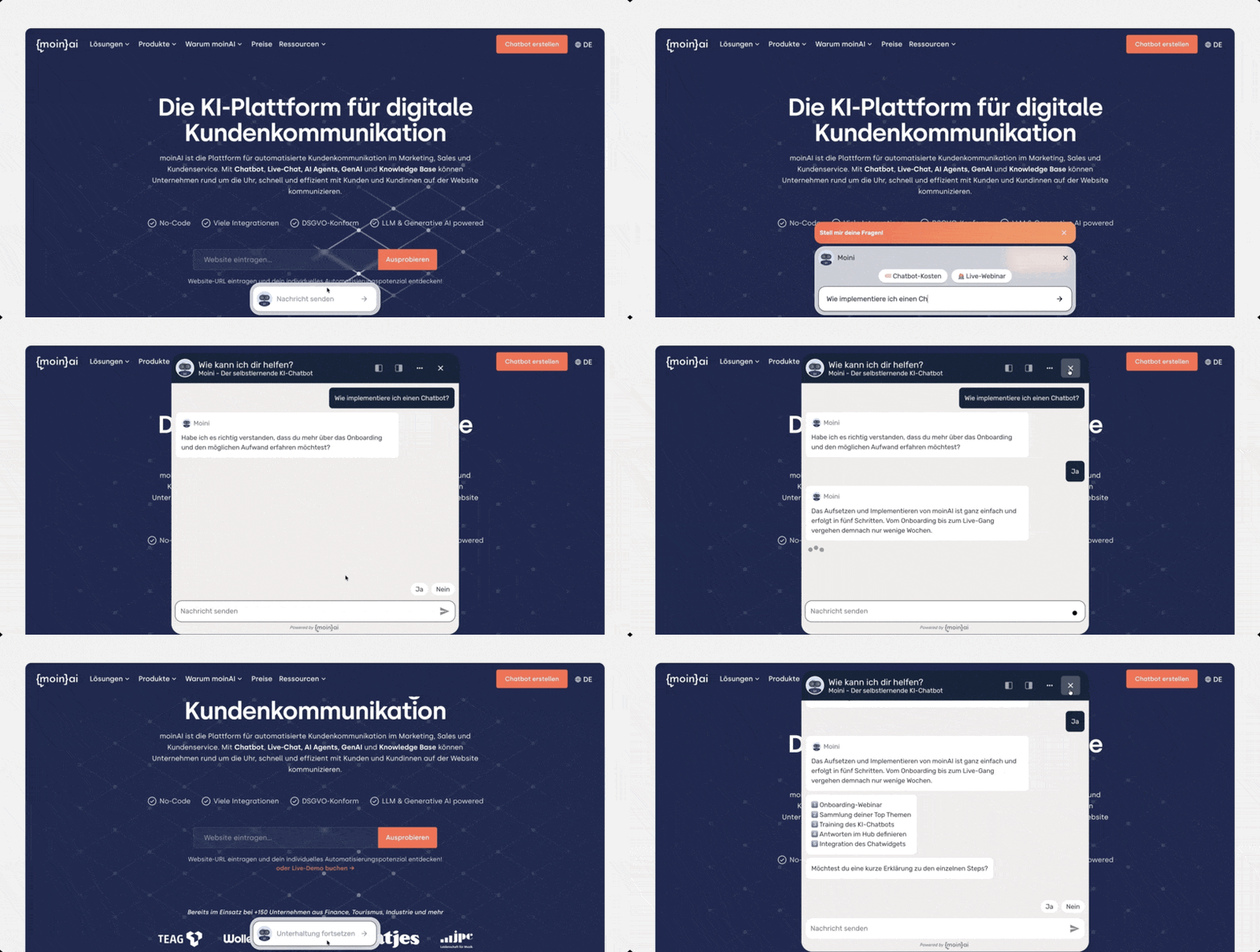
The new release now includes the so-called feature banner: an inline input bar that is prominently placed on the website, for example in the hero section of the homepage. This means that website visitors are immediately presented with an inviting input bar, topped by a promotional banner that specifically draws attention to the chat feature.
.avif)
A typical use case might look something like this:
- A website visitor types a question into the hero search bar;
- the text is then automatically transferred to the chat widget,
- and the conversation begins straight away on the relevant topic.
→ This significantly lowers the barrier to entry!
Improved Accessibility and Multilingual Support
With the new release, the widget has also been significantly enhanced in terms of accessibility: colour contrasts now meet the AAA standard, and screen reader users receive improved audio feedback, for example, when the widget docks or an operator responds. In addition, the widget now supports Norwegian and automatically recognises regional language variants such as de-AT as German.
Can a Chatbot Replace Website Forms?
A common criticism of websites is that they do not exactly make it easy for users to submit contact enquiries. In many cases, website visitors have to click through various subpages and then fill in a lengthy contact form – even if they only have a straightforward query that could actually be answered quickly.
A chatbot solves this problem, as it can assist website visitors and answer questions within seconds. But a chatbot can also take over the function of a website form. At moinAI, these forms are called bot forms.
Whether it’s customer service, marketing or sales – bot forms are ideal for all these use cases, as they automatically request and record information and forward it to the desired CRM system. The same would apply when requesting a quote. Suppose a website visitor is interested in a particular service or product and would like to request a no-obligation quote – they can simply do so via a chatbot conversation.


Alternative: Display the Chatbot via the Existing Live Chat Widget on the Website
If your company already uses a live chat system for customer communication, the chatbot can be easily integrated into your existing live chat widget via an API. This enables website visitors to have a seamless conversation, regardless of whether they are communicating with a live chat agent or the chatbot. One example of the combined use of live chat and chatbot in a chat widget is moinAI customer Cyberport. The German e-commerce company Cyberport uses both Userlike’s live chat solution and moinAI’s AI chatbot for digital customer communication.
-> More about combining chatbot and live chat on the website.
What Are the Benefits of a Chatbot on the Website?
Finally, some of the advantages of a chatbot on the website — at a glance.
- 24/7 service for your website visitors
No matter what day or time, the chatbot receives your website visitors and answers diligently arising questions — fully automated and scalable.
- Automate recurring questions
Many website visitors come to a company's website with a very specific concern, and this concern is often expressed in a question that is asked over and over again. Simple and recurring questions in particular cost the service team valuable time. A chatbot answers these questions without the need for any other resources.
- Present the company on the website in a CI-compliant manner
Represent your company with a chatbot in exactly the style that is compatible with the brand. Both the teaser, the widget and the chatbot answers can be adapted exactly to your company.
- By means APIs and webhooks forward all information
Regardless of whether a live chat tool or CRM systems are already in use. The moinAI chatbot can be easily integrated into the existing system landscape and thus routes all relevant information exactly to where your employees need it.
The Dreaming AI feature allows you to find out what motivates and interests your website visitors — apart from the topics and questions that are already known and expected. The collected user insights are clustered by AI into topics and can be viewed in the hub.
- Millennials and Gen Z don't like talking on the phone
This point may be seen with a wink, but it is also a fact that the younger generation in particular clearly prefer chatting to making phone calls. It is not for nothing that the cliché exists that millennials are “afraid” of making phone calls. If a company not only wants to serve but also inspire the younger generation, both high availability and the ability to chat based on text are required.
- More conversations thanks to prominent widget placement
The new feature banner mode allows the chat widget to be positioned as a central input bar in the hero section; this increased visibility is already proving highly beneficial: initial results show that it can almost double the proportion of website visitors who start a conversation.
A Chatbot on Your Own Website
Try out how a chatbot works on your website free of charge and without obligation! Simply enter the URL and the first chatbot topic suggestions are created. Get started now!
[[CTA headline="Discover your chatbot prototype!" subline="Enter a URL, get some initial ideas for automation, and see for yourself." placeholder="Insert your company URL here" button="Try it now!"]]


